The Barnwright Dealer Center
Your buildings. Your prices.
Your call.
Change any building, option or price yourself, and your 3D designer shows it right away. Every design your customers make lands here as a quote, on the right lot’s list, ready to follow up. No waiting on the manufacturer or a web designer.
Included with your 3D designer: $0 setup, $250 a month, any number of lots. No per-user fees.
The real Dealer Center
Run every lot from one screen.
These are real screens from our Dealer Center demo, filled with a made-up shed business: three lots and thirty customers. Click through them here, or open the demo and sign in as the owner or one of the dealers.
- TodayWho to call first
- CustomersEvery lead, every stage
- OrdersFrom sold to delivered
- Price listChange it once
- LotsA 3D designer for each
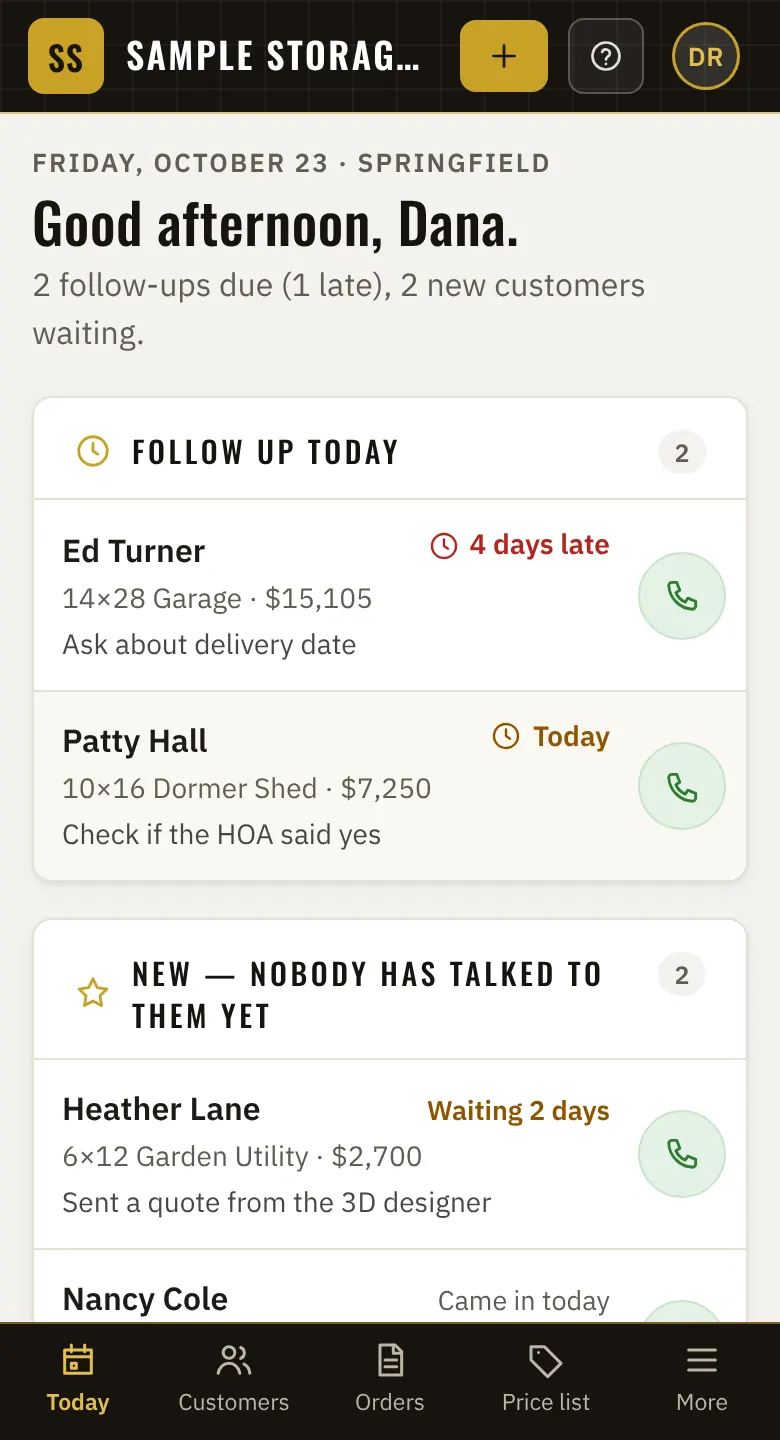

Start every morning knowing who to call.
Follow-ups that are due and how late they are. New customers nobody has talked to yet, like the ones who just sent a quote from your 3D designer. This month’s quotes, sales and deliveries. One tap to call.

Every customer, and where they stand.
New, contacted, quoted, sold, delivered or lost. See them on a board or a list, show only yours, search by name, phone or building, and download the whole list as a spreadsheet anytime.

Every sale, until it’s on the ground.
Sold, sent to the builder, ready, delivered. Each order shows the building, the total, cash or rent-to-own, the delivery date and the lot that sold it. A late delivery turns red.

Change a price once. Every lot’s 3D designer shows it.
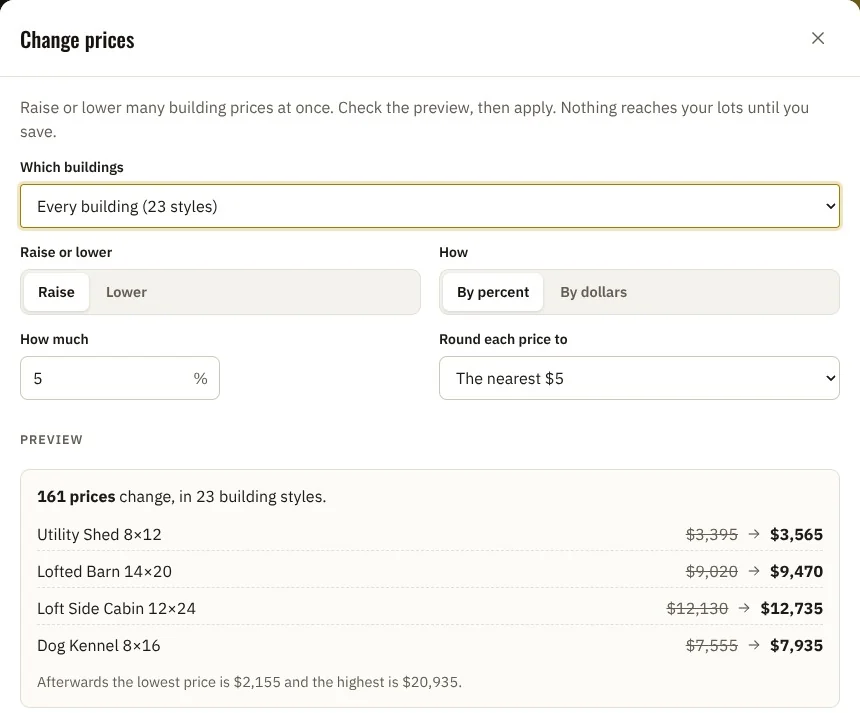
Your buildings, sizes, doors, windows, options and colors in one place. Raise everything by a percent with Change prices and check each new price before you save. The History tab keeps every change.

Every lot gets its own 3D designer link.
Put each lot’s designer on its website. See the lot’s customers and sales this month, its hours, and who works there. Every lot sells from the same price list.
Owners and managers see every lot. A dealer sees only their own.
The demo opens in a new tab. Pick who you want to be. Nothing you do there is saved or sent.
What it does
Everything a lot needs. Nothing it doesn’t.
The Dealer Center comes with your 3D designer. Nothing to install: it opens in a web browser on a computer, a tablet or a phone.
Today
Who to call first. Follow-ups that are due or late, new customers nobody has talked to yet, deliveries coming up, and this month’s quotes and sales for each lot.
Customers
Every customer in a stage: new, contacted, quoted, sold, delivered or lost. A board or a list, “only mine”, search, and a spreadsheet download anytime.
Orders
Sold, sent to the builder, ready and delivered. The building, the total, cash or rent-to-own, the delivery date and the lot, on one line.
Price list
Your buildings, sizes, doors, windows, options and colors. Change one price or all of them by a percent. Every lot’s 3D designer shows it when you save, and the history keeps every change.
Lots
Each lot has its own 3D designer link to put on its website, its own customers and sales, its hours and the people who work there. Add as many lots as you like at no extra charge.
Team
Owner, managers and dealers. Owners and managers see every lot; a dealer sees only their own. Add as many people as you like: there are no per-user fees.
Change prices
Raise every building 5%. Check all 161 prices. Then save.
Raise or lower prices by a percent or by dollars. You see every new price before anything changes. Nothing reaches your lots until you save, and quotes you already gave keep their price.
 On the lot, on your phone
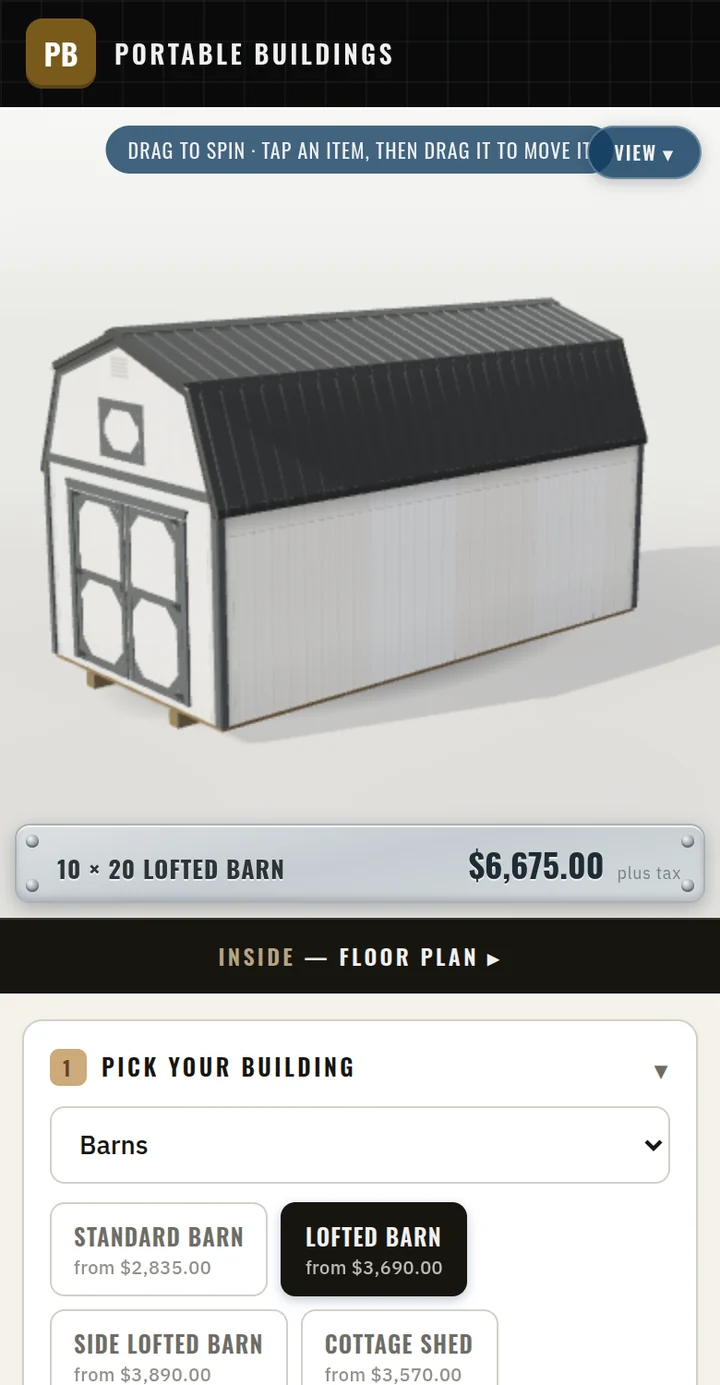 What your customer designs
Where the customers come from
Every 3D design becomes a customer on the right lot.
Your customer picks a building in your 3D designer, places the doors and windows, chooses colors and options, sees the price and sends it. It lands in the Dealer Center as a new customer with their quote, on the lot whose designer they used, waiting for a call.
The designer reads the same price list you change in the Dealer Center, so the price they see is always yours.
See the 3D designerComing soon
More we built for our own lot.
We built these for Yoder Storage Barns, as part of the full Barnwright software. They aren’t for sale yet. If one matters to you, tell us on your demo.
Reply assistant Coming soon
Answers customer messages with a link to their building in 3D, priced from your sheet, and holds any reply it isn’t sure of for a person.
Card payments Coming soon
Take a deposit or the whole thing on a card, on the spot or by a text link, and it lands on the order by itself.
Rent-to-own billing Coming soon
Sign the plan on a phone, and the monthly payment charges itself on the day it is due.
Your lot on your website Coming soon
Photograph a building on the lot and it is on your website with its price, ready to hold or buy.
E-signed paperwork Coming soon
Sent for signature, signed on a phone at the gate, and filed against the building it belongs to.
Delivery runs Coming soon
Each stop on the driver’s phone with its day, the money due at the gate and whether the paperwork is signed.
See it with your own buildings.
In 15 minutes we’ll show you the 3D designer and the Dealer Center, set up the way your lot would be. $0 setup, $250 a month, any number of lots. No per-user fees.