What we’ve built
One building.
Every part of a business.
Scroll, or use the arrows, to follow the building through every screen
Everything on this page was built for one shed company: Yoder Storage Barns in Port Charlotte, Florida, where it runs every day. Follow one building through the designer, the dealer, the office, the shop and the delivery truck, with the same details following every step.
The full Barnwright software isn’t for sale yet. It runs every day at Yoder Storage Barns, and we’re getting it ready for other businesses. Ready today: the 3D Designer and Dealer Center, $0 setup and $250 a month.
When it opens: use it as it is, or have it built around you. The Barnwright software will be $500 a month with no build fee. A custom version, built for the way you work from these same parts, will be the same price. How a build will go.
Two configurations, one system
Built for a company with a crew. Built again for one man and a nail gun.
The same job record, two very different businesses. That is the point of building custom: the software is sized to the operation, not the other way round.

Built for a company with a crew
A company with people in it
Everything a company with a crew and dealers needs, in one system:
- Dealer lots, as many as you have, each seeing only its own sales
- A build schedule the floor actually follows, and piece-rate pay worked out from the work orders
- Delivery on the driver’s phone, with their pay sheet
- Rent-to-own, charged on the day it is due; paperwork e-signed at the gate
- Monthly profit, margin per building, and an export for the accountant
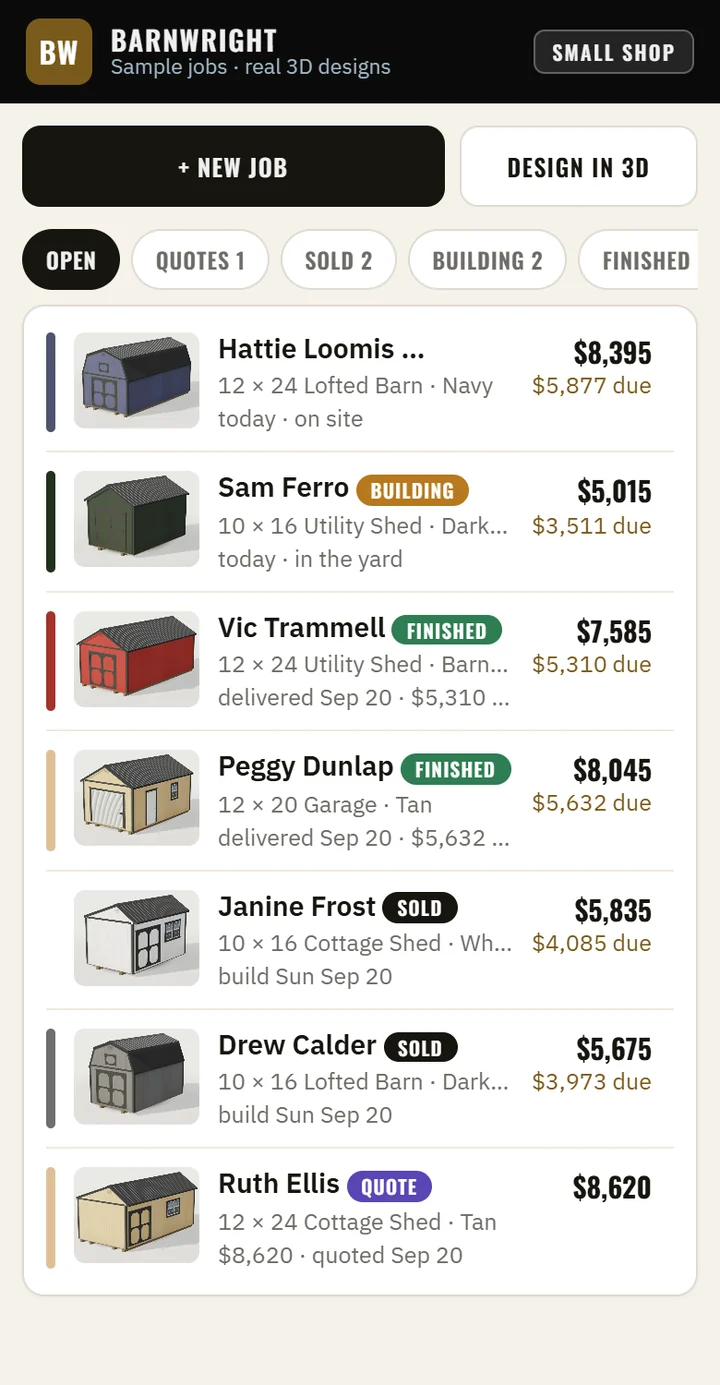
Real software, sample names and numbers.
Built for a one-man shop
One man and a nail gun
For somebody who builds barns without a company around them — on his own, or with a helper or two, in his own yard or on the customer’s ground. Six screens hanging off one idea: the job. Quoted, sold, built, finished, paid.
- Today, Jobs, Calendar, Lot, Money, Setup
- A one-person business switch that puts the builders, painter and roofer away
- The same 3D designer, invoices and card payments
- Your in-stock buildings listed on your own website, straight from the Lot screen
- The crew, dealer and delivery screens switched off until they are needed
How we designed it
Everything hangs off the job.
Not modules you have to keep in step. One building, one record, five stages — and the money, the crew pay and the paperwork all read it.
Your prices, not ours
One price sheet, and it is yours.
Set a price on any size, add sizes we have never heard of, put a price on any add-on and invent your own — charged each, per foot, as a percent of the building, or by the square foot. Turn off the ones you do not offer.
Then the three places a number can appear — a job you type in, a barn a customer draws in 3D, and the printed quote — all charge exactly the same money, because all three read that one sheet. Most shed software makes you buy the 3D designer from a second company, with a second setup fee and a second monthly bill, and the two never read the same sheet. Here they cannot disagree.
Tell us how you price
The real sheet. The book price is only a starting point — put your own number in the box and the designer, the quote and the invoice all use it.
Have a go
This is what your customer gets.
The same designer, reading the same sheet as your quote. Yours would carry your buildings, your sizes and your numbers.
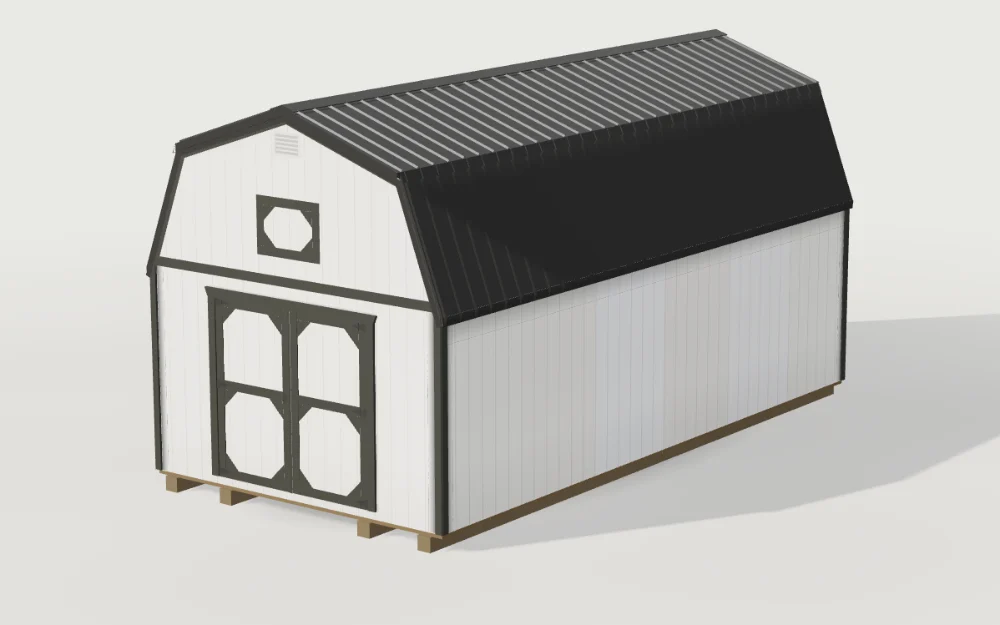
- 12×24 Lofted barn, White
- $8,395
Change a price once, in one place, and the designer, the text your customer gets and the quote you send all say the new number. That is the whole argument, and it is the one thing two separate companies cannot promise you.
Who opens what
Everybody sees their own job and nothing else.
A builder does not need the pricing screen and should not be able to open it. What each person sees is decided on the server, not by hiding a button.
The office
Headquarters: every building from quoted to paid, the dealers, the pricing, the reports, the profit this month and the money owed. The owner’s desk lives here too.
The shop
Shop Floor: what gets built today, the work orders with the drawing on them, and what the shop has earned for them, per person, per building.
The crew
Crew: this is mine, this is what it pays. Opens on a phone, works with no signal, nothing else on it.
The driver
Delivery: today’s stops, the map, what to collect at the door, the paperwork signed at the customer’s gate, and their own pay sheet.
The dealer
Dealer Hub: their leads, their orders, their calendar, their reminders and their pay. Their own, and never anybody else’s.
The customer
A 3D designer on the company’s website, a private link to see, sign and pay for their building, and a lookup that says where it is in the build.
Not a drawing
The board, and the tag in a builder’s hand.
Both of these are screenshots of the software running. The buildings and the names in them are invented; everything else on the screen is what you would get.

The orders board. The ten with nobody on them sit on top, because those are the only ones anybody has to do something about. Everything below is already somebody’s.
On the line
A work tag, not a spreadsheet.
The painter opens one screen and sees the next building: its number, whose it is, and the three colors it is going in. He picks his name and taps it off. The roofer’s screen is the same screen with roofs on it.
Nobody on the line types a price, sees a price, or can get to one.
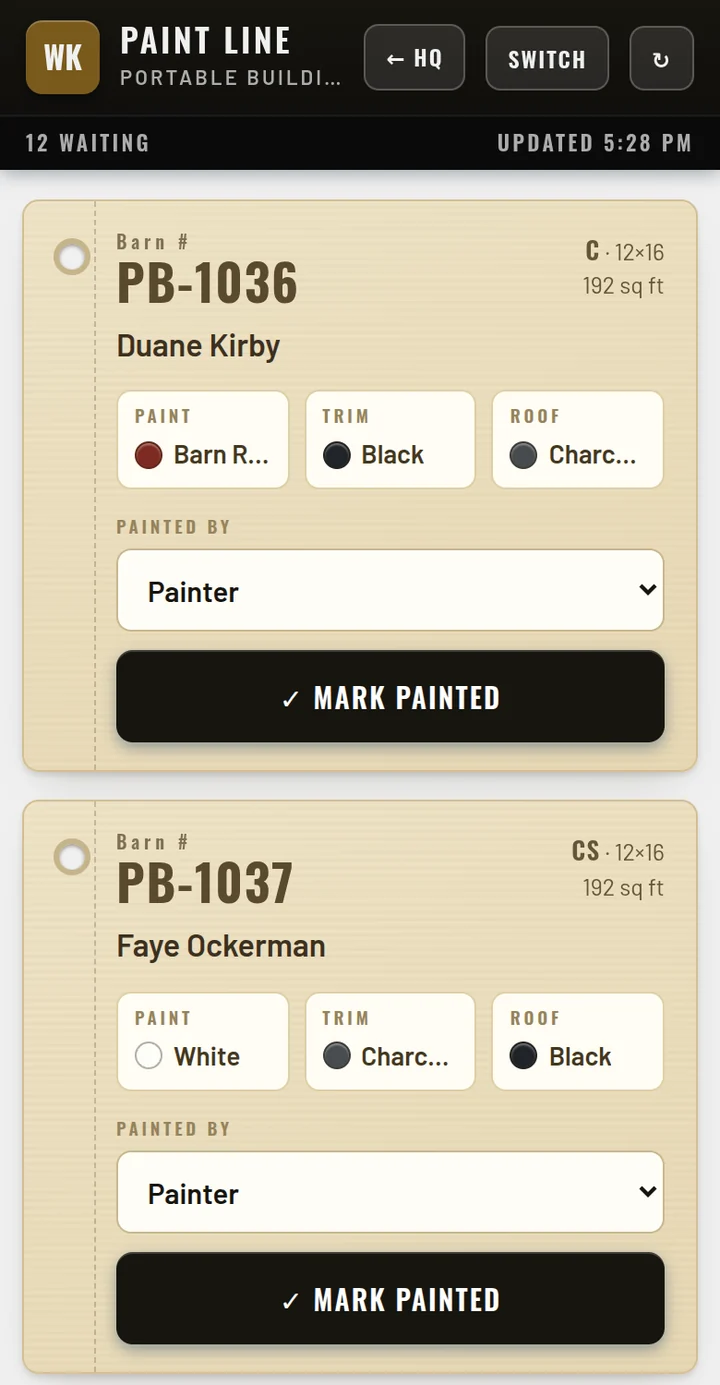 Crew · paint line
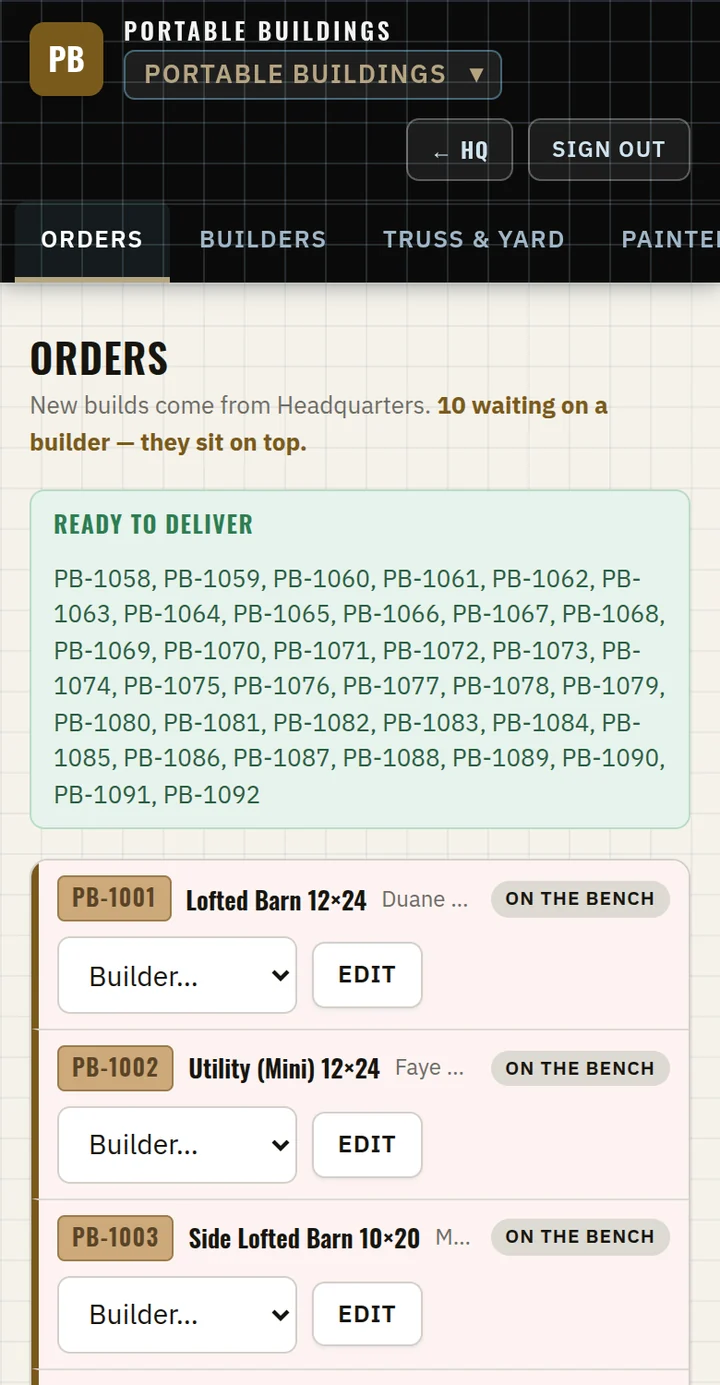 Shop floor · on a phone
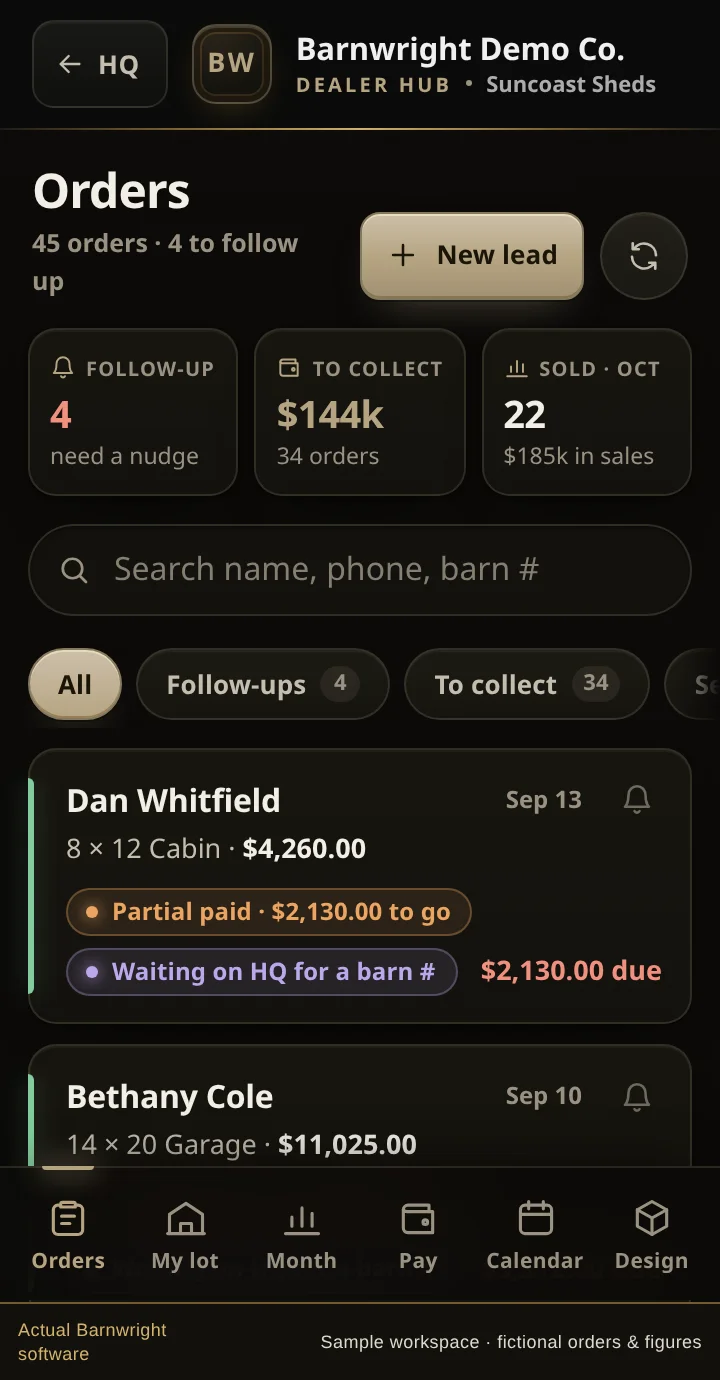 Dealer Hub · a lot’s own sales
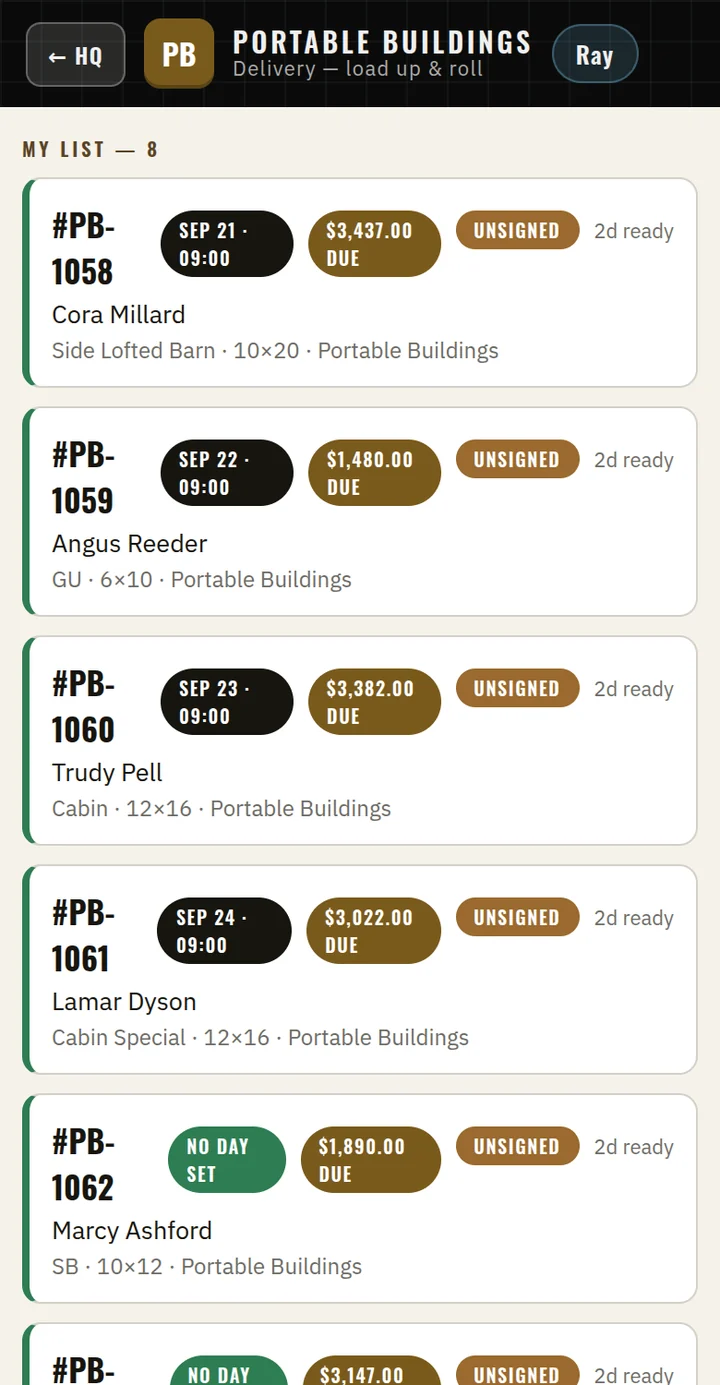 Delivery · today’s run
On the road
The driver knows what to collect before he knocks.
Each stop shows the day, the address with one tap for directions, the balance due at the gate, and whether the paperwork is signed. He can text a secure card link from the driveway. Tap Delivered and the driver gets paid, the office knows, and the customer’s tracker updates.
The dealer’s phone is the same idea for a different job: one dealership’s leads and orders, and nothing that belongs to the lot down the road. See the dealer build, and the assistant.
In development · what we would build next
Know what each building earned.
Vendors, their products and unit prices, then the quantity of every material used on each building, subtracted from what the building sold for. Material recipes and estimated-versus-actual margin per building already work; the full vendor-to-profit month-end report is still being built. It is the one thing on this page that is not finished, and it is labeled that way in the tour above.
How a build like this goes live
Your prices first. Everything else follows.
You answer questions about your own business. We do the typing.
We agree the features and the price
A plain list of what your build will do, screen by screen, and a fixed monthly price with no build fee, before any work starts. If we do custom work for you and you don’t like it, you get your money back.
We load your sheet and wire the money
Every building, size, option and price, checked line by line against what you already quote. Card payments, rent-to-own and your bookkeeping, tested on real amounts we then refund, so the first live payment is not the first payment.
You run one job through it
One real building, quoted to delivered, with us on the phone. Then the next one. After that it runs on its own, and the monthly service keeps it running.
What would this look like for your business?
Take the screens that caught your attention and tell us what you would change. Your software starts with the way you want to work.